
Image: Blogtrepreneur / Wikimedia Commons (CC BY 2.0)
Small businesses often assume they are too small to be worth attacking. Unfortunately, attackers rarely pick targets one by one. Phishing emails, password-guessing tools and fake invoice scams are sent in bulk, and they succeed wherever basic defenses are missing. A five-person accounting practice or a solo online shop can be just as exposed as a larger firm, with far fewer resources to recover.
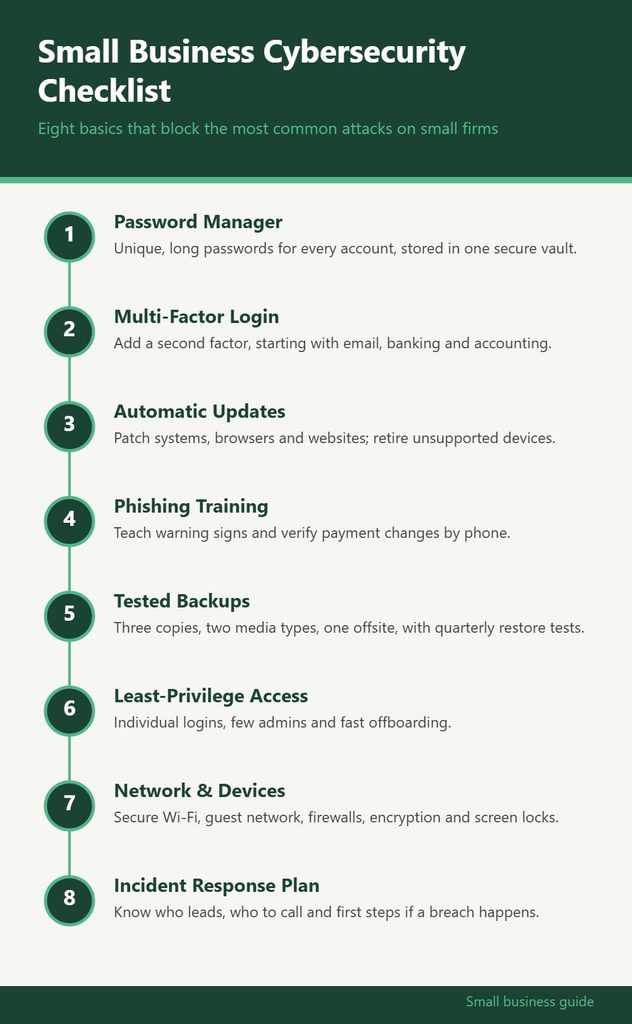
The good news is that most successful attacks on small businesses exploit a short list of weaknesses: reused passwords, missing two-factor authentication, outdated software, untrained staff and no working backup. Fixing those does not require a security team. It requires a checklist and the discipline to work through it. The infographic below summarizes eight basics, and the sections that follow explain how to put each one in place.
1. Lock Down Passwords With a Password Manager
Reused passwords are the single most common way small business accounts get taken over. When a password leaks from one site, criminals try the same email and password combination on banking, email and cloud services. If you have used it anywhere else, those accounts are open.
A password manager solves this by generating and storing a long, unique password for every account. You remember one strong master password, and the manager fills in the rest. Business versions add shared vaults so team members can access the accounts they need without passwords being passed around in chat messages or sticky notes.
Practical steps:
- Choose a reputable password manager with a business plan if you have staff.
- Start with the highest-value accounts: email, banking, payroll, accounting and domain registrar.
- Replace any reused or short passwords as you go.
- Use a long passphrase for the master password and protect it with two-factor authentication.
2. Turn On Multi-Factor Authentication Everywhere
Multi-factor authentication (MFA), often called two-factor authentication, requires a second proof of identity beyond a password, such as a code from an authenticator app or a physical security key. Even if a password is stolen, the attacker usually cannot log in without that second factor.
Prioritize MFA in this order:
- Email accounts. Email is the master key, because password resets for nearly every other service go there.
- Banking and payment platforms.
- Accounting, payroll and tax software.
- Cloud storage and file sharing.
- Website, domain and hosting accounts.
- Social media accounts used for the business.
Authenticator apps and hardware security keys are generally stronger than text message codes, which can be intercepted through SIM-swap scams. Text codes are still far better than nothing, so use them where they are the only option. Save the backup codes each service provides in a secure place.
3. Keep Software and Devices Updated
Software updates frequently patch security holes that attackers already know how to exploit. Every week a device goes without updates is a week it remains vulnerable to known attacks.
Make updating automatic wherever possible:
- Enable automatic updates for operating systems on laptops, desktops and phones.
- Turn on auto-updates for browsers, which are a primary target.
- Update your website platform, plugins and themes, or use a host that handles this.
- Replace routers, computers and phones that no longer receive security updates from the manufacturer.
A simple habit helps: when a device asks to restart for updates, let it at the end of the day rather than postponing for weeks.
It also helps to keep a basic inventory of every device and major application the business uses, along with who is responsible for it. A spreadsheet is enough. Note the device type, the operating system, the owner and whether automatic updates are on. That list makes it obvious when an old tablet in the back office or a forgotten point-of-sale terminal has quietly stopped receiving patches. It is also the first thing an IT provider or insurer will ask for if something goes wrong, so building it now saves time later.
4. Train Your Team to Spot Phishing and Fraud
Technology catches a lot, but people are still the last line of defense. Phishing emails impersonate banks, suppliers, delivery companies and even the business owner. A common scheme is business email compromise, where a criminal poses as a vendor or executive and asks for an urgent payment or a change in bank details.
Training does not need to be elaborate. Cover these warning signs in a short team meeting and repeat it every few months:
- Urgency or pressure (“this must be paid today”).
- Requests to change payment details or buy gift cards.
- Sender addresses that are slightly off from the real domain.
- Unexpected attachments or links asking you to log in.
Most importantly, set a firm rule: any request to change bank details or send an unusual payment must be verified by calling the person at a phone number you already have on file, never one listed in the suspicious email. That single rule stops a large share of payment fraud.
5. Back Up Critical Data and Test the Restore
Ransomware encrypts your files and demands payment to unlock them. Hardware fails. Laptops get stolen. In every case, a working backup turns a disaster into an inconvenience.
A widely used rule of thumb is to keep three copies of important data, on two different types of storage, with one copy kept offsite or offline. For a small business, that might look like the working files on your computer, a cloud backup service, and a periodic copy on an external drive that is disconnected when not in use.
The step most businesses skip is testing. A backup you have never restored is only a hope. Once a quarter, try restoring a few files, or a full folder, to confirm the process works and you know how to do it under pressure. If you want a deeper walkthrough of backup approaches and the software that supports them, GrowBizLab covers small business software choices in practical terms; you can find more information on its software guides.
6. Control Who Has Access to What
Every account and permission you grant is a potential entry point. The principle of least privilege means each person gets access only to what they need for their role, and nothing more.
Put this into practice:
- Give each employee their own login rather than sharing accounts. Shared logins make it impossible to track who did what or to remove one person cleanly.
- Limit administrator rights to as few people as possible, and use a separate non-admin account for daily work.
- Remove access immediately when someone leaves the business or a contractor’s project ends. Keep a simple offboarding checklist.
- Review access lists for key systems twice a year.
Pay special attention to contractors and freelancers. They often receive broad access during a project and keep it long after the work ends.
7. Secure Your Network and Devices
Your office or home network carries business data every day. Basic network hygiene goes a long way:
- Change default router passwords and use strong Wi-Fi encryption.
- Create a separate guest network for visitors and personal smart devices.
- Turn on the built-in firewall on each computer.
- Use built-in full-disk encryption on laptops so a stolen device does not mean stolen data.
- Enable screen locks with short timeouts on every computer and phone.
- Be cautious on public Wi-Fi; use your phone’s hotspot or a trusted VPN for sensitive work.
If employees use personal phones or laptops for work, set minimum expectations in writing, such as screen locks, updates and no shared family accounts on work apps.
8. Prepare an Incident Response Plan
Even well-protected businesses can be breached. What separates a manageable incident from a business-threatening one is often how quickly you respond. An incident response plan does not need to be long; one or two pages is fine.
Your plan should answer:
- Who is in charge when something goes wrong, and who is the backup.
- Who to call: your IT provider, bank, insurer, and possibly a lawyer.
- First steps: disconnect affected devices from the network, change compromised passwords, and contact your bank immediately if payments are involved.
- How to communicate with customers and staff if their data may be affected.
- Where to report: depending on your location and the data involved, you may have legal obligations to notify customers or authorities. Breach notification rules vary by state and country, so check the requirements that apply to you.
Also look at cyber insurance. Many insurers now offer cyber policies for small businesses, and some general policies include limited coverage. Read exclusions carefully, since insurers increasingly require basics like MFA and backups as a condition of coverage. A broker can help compare options.
Where to Get Reliable Guidance
Several public resources publish free, vendor-neutral security advice for small businesses, including national cybersecurity agencies and small business administration offices in many countries. Your bank, insurer and IT provider may also offer checklists tailored to your setup.
For owners who want security considered alongside other operational decisions, such as choosing software, setting up business bank accounts or reviewing insurance, GrowBizLab publishes practical guides across those topics. To browse its small business how-tos, click here and start with the software section.
Putting the Checklist to Work
You do not need to finish all eight items this week. A realistic rollout looks like this:
- Week one: turn on MFA for email and banking, and enable automatic updates.
- Weeks two and three: roll out a password manager and replace weak or reused passwords.
- Month one: set up and test backups, review access, and hold a short phishing awareness session.
- Month two: harden your network, write the incident response plan and review insurance.
Then put a recurring reminder on the calendar to revisit the checklist every quarter. New employees join, new tools get added and old devices age out. Cybersecurity is not a one-time project; it is a routine, much like bookkeeping. Treated that way, it becomes manageable, and it makes your business a much harder target than the next one on the attacker’s list.